
Research
Define
Ideate
Prototype
Today’s phones are app-centric: even simple tasks (like booking a ride or paying a bill) require jumping across separate apps with different flows, logins, and patterns. This leads to extra steps, fragmented attention, and unclear data handling. People already use AI to compare and decide, but that intelligence sits inside individual apps and cloud services. There is a need for a system-level approach that reduces switching costs, clarifies privacy, and supports decisions directly on the device.
Cognitive Load and Mental Fatigue Problems
Users waste time switching between apps instead of just getting things done.
Current OS (iOS, Android) are basically grids of apps, not real helpers.
Rise of AI , AI can actually control all your apps with API
Accessibility and Inclusivity Problems
Navigation and Discoverability Issues
Pain Point 1
Context Switching Fatigue → 9.5 minutes recovery time per app switch, 58 switches daily
Pain Point 2
App Abandonment Syndrome → 71% of apps abandoned within 90 days, 25% never used after installation
Pain Point 3
Interface Fragmentation → Users must learn 80-90 unique interfaces despite using only 10 apps daily
$450 billion annual productivity loss due to context switching inefficiencies
7.8 billion work-years wasted globally each year
Massive productivity hemorrhage from cognitive overhead of app-centric mobile computing
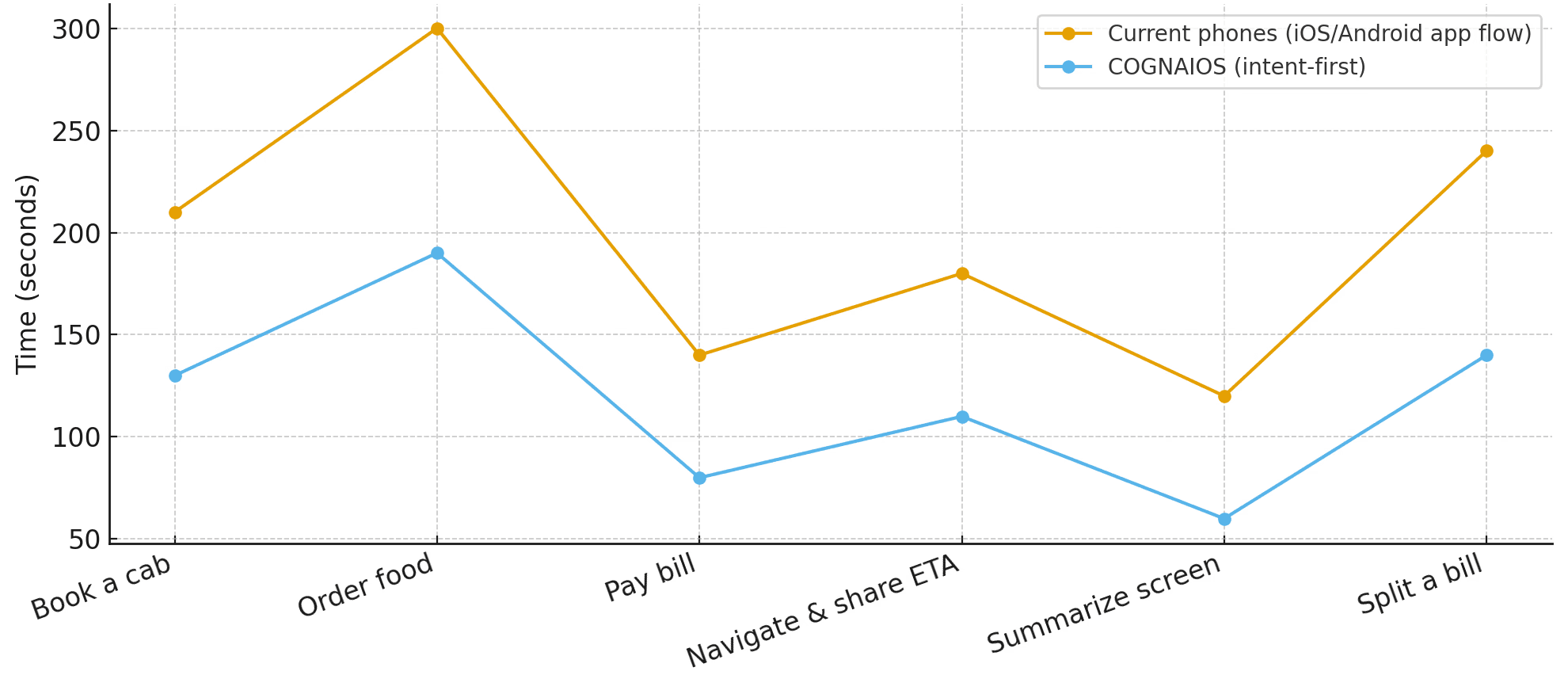
Fewer steps from intent to confirmation (vs. current app flow).
Lower reported cognitive load in quick user tests.
Reduced time on Apps
Understand the cognitive and productivity impacts of app-centric smartphone design65% expected to spend more on leisure travel in 2024
Quantify user behaviors related to context switching, app usage, and task completion
Identify core user pain points and unmet needs in the current mobile ecosystem
Benchmark existing solutions (voice assistants, automation tools, OS modifications) to locate gaps

Productive Priya
Age: 34
VP of Sales, Enterprise Tech
Apps Installed: 115+ (Slack, Jira, WhatsApp, Swiggy, Uber, School Parent App, Banking, etc.)
Tech Proficiency: High (Power User)
Frustrations
Logistical Friction: "I spend 20 minutes rescheduling a trip when a meeting runs late. That’s 20 minutes I’m not preparing for my next pitch."
Context Fragmentation: "I have to open Salesforce for client data, Gmail for correspondence, and LinkedIn for profiles just to prep for one meeting."
Administrative Drag: "Approving expenses, scheduling follow-ups, and filing reports feels like low-value manual labor that drains my energy."
Notification Overload: "My phone buzzes constantly. I miss the critical signal (a deal closing) in the noise of Slack, email, and news alerts."
Goals
Maximum Efficiency: Wants every interaction with his phone to take <10 seconds.
Zero-Friction Logistics: Needs travel, scheduling, and admin to happen "automagically" in the background.
High-Context Intelligence: Wants his phone to act like a proactive Chief of Staff, not a passive tool.
How COGNAIOS Helps
One-Shot Command: "My meeting ran late. Push my flight to the evening and move my dinner reservation to 8 PM." (Orchestrates airline, calendar, and restaurant apps instantly).
Intelligent Briefing: "Brief me on Acme Corp." (Synthesizes CRM data, recent emails, and news into a concise audio summary).
Proactive Gatekeeping: Focus Mode automatically silences everything except messages from his top 3 clients and family, ensuring he never misses what matters.

Determined David Bhai
Age: 77
Retired Teacher (72) with mild tremors and declining vision.
Independent living, wants to stay connected but finds modern UI hostile.
Tech Proficiency: Low
Frustrations
Interface Hostility: "The buttons are too small, and the menus keep changing. I’m terrified of pressing the wrong thing and deleting something."
Login Anxiety: "Every app wants a password. I can't type them on this tiny keyboard, so I just don't use the apps."
Update Fear: "I never update my phone because I’m scared the icons will move and I won’t know how to call my grandkids anymore."
Dependency: "I hate having to wait for my daughter to visit just to order my medicine or pay a bill online. I want to do it myself."
Goals
Independence: Wants to manage her own life (health, bills, family connection) without help.
Simplicity: Needs an interface that doesn't require memorizing steps or precise finger movements.
Safety: Wants to feel secure that she hasn't "broken" anything or been scammed.
How COGNAIOS Helps
Natural Language Control: "Order my heart medicine." (No tiny buttons, no navigation—just voice confirmation).
Invisible Security: COGNAIOS handles the logins and forms in the background. Maggie never sees a "Password Incorrect" screen again.
Consistent Interface: The interface is just a conversation. It never "changes" or moves icons around. It simply listens and responds.
Guided Action: "Call my grandson Leo." (Connects video instantly without navigating menus).
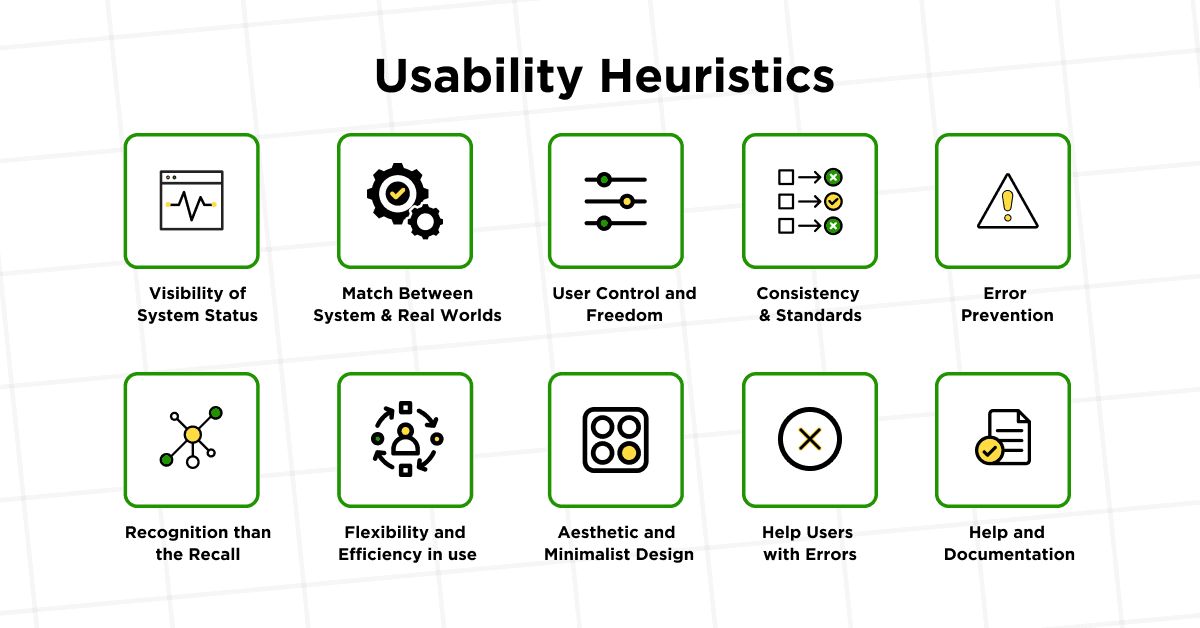
The evaluation was conducted using Nielsen’s 10 Usability Heuristics, a widely accepted set of principles adapted specifically for the mobile context. These heuristics were chosen for their ability to highlight fundamental user experience challenges relevant to cognitive load, navigation, error handling, and system feedback.
Operating Systems: iOS 18, Android 14
Core Mobile Applications: Messaging, Calendar, Email, Travel Booking, Financial Management, Health & Fitness Apps (top 5 each platform)
Supplementary UI Layers: Popular app launchers, voice assistants (Siri, Google Assistant), and automation tools (Tasker, IFTTT)
App-Hopping and Context Switching for One Task
Heuristic Violated: Recognition Rather Than Recall; Flexibility and Efficiency of Use
Evaluation: Users must switch between multiple distinct apps to complete single workflows causing repeated mental context shifts and memory burden. Neither platform provides unified task management or seamless workflow integration, leading to productivity loss and fatigue.
Inconsistent UI Patterns Across Providers
Heuristic Violated: Consistency and Standards
Evaluation: Each app exhibits unique navigation, terminology, and design patterns.
Decision Fatigue When Comparing Options
Heuristic Violated: Aesthetic and Minimalist Design; Recognition Rather Than Recall
Evaluation: Multiple apps present conflicting or complex data sets for decisions such as prices or features, without simple comparison tools. This overwhelms users with choices spread across interfaces lacking consolidation, leading to suboptimal decisions and mental exhaustion.
Too Many Steps to Reach a Simple Outcome
Heuristic Violated: Flexibility and Efficiency of Use; Visibility of System Status
Evaluation: Tasks require navigating numerous app screens, repeatedly inputting data, and manual inter-app coordination. Lack of efficient shortcuts or automation extends interaction time unnecessarily, compounded by poor progress visibility.
Steep Learning Curve for Less Tech-Savvy Users
Heuristic Violated: Match Between System and Real World; Help and Documentation
Evaluation: The multiplicity of apps and diverse UI conventions make mobile computing inaccessible for less experienced users. Limited in-context assistance and inconsistent metaphors lead to frustration, reducing technology adoption and satisfaction.
Accessibility Challenges for Users with Disabilities
Heuristic Violated: Match Between System and Real World; Flexibility and Efficiency of Use
Evaluation: Current platforms and their apps often lack consistent accessibility support such as voice control, screen readers, and adaptable interaction methods. The fragmented ecosystem forces users with visual, motor, or cognitive impairments to learn multiple distinct interaction patterns without unified assistive technology, severely limiting usability and independence.
Apple: “Apple Intelligence” is built into iOS/iPadOS/macOS with on-device processing and a privacy-audited “Private Cloud Compute.”
Google (Android): Gemini Nano runs on-device inside Android’s AICore system service.
Microsoft (Windows): Copilot+ PCs run AI features locally on NPUs, with Windows AI/Copilot Runtime APIs for developers.
iOS actions: App Intents let the OS/assistant trigger app capabilities (intent→action).
Android actions: Built-in Intents (App Actions) model common tasks the assistant can fulfill.
Ambient devices: Meta Ray-Ban smart glasses ship with assistant features (AI moving into wearables).
AI OS moves: HP agreed to acquire Humane’s Cosmos AI platform and related IP.
OpenAI hardware push: OpenAI announced it is merging the io device team led by Jony Ive into the company.
Qualitative Interviews & Surveys (n = 25)
To understand the lived experiences behind the numbers, we conducted in-depth interviews and surveys with 25 smartphone users across diverse professions and geographies. Each session lasted 45–60 minutes and explored participants’ daily workflows, frustrations, and coping strategies when using multiple mobile applications.
Context Loss Anxiety
“I always dread switching apps mid-task. I worry I’ll forget what I was doing or miss a step.” Participants described mental “bookmarks” that ruin task flow when lost, forcing them to recreate context manually.
Authentication Fatigue
“Logging into so many different apps with different passwords is the worst part of my day.” Users reported carrying password managers on one hand and frustration on the other, often delaying important tasks to avoid repeated logins.
Choice Paralysis
I have dozens of apps for the same thing—note-taking, travel, fitness—and I never know which one to open.”
This indecision led many to default to a handful of familiar apps, neglecting others they’d paid for or invested time in customizing.
Workflow Fragmentation
“Booking a flight turns into a 20-minute ordeal of switching between email, calendar, maps, and my bank’s app.”
Participants described multi-step tasks that spill across 4–8 apps, creating friction and increasing the likelihood of errors or abandonment.
Current mobile workflows impose high cognitive load from app-switching and recall; users need an intent-first, system-level surface that automates repetitive steps and centralizes status.
Fewer steps
Faster decisions
Reduced Cognition
Clear control
Design
Intent Focused OS
Business
OS-level API orchestration across existing services
User
lower cognitive load for everyday tasks
Intent-to-action
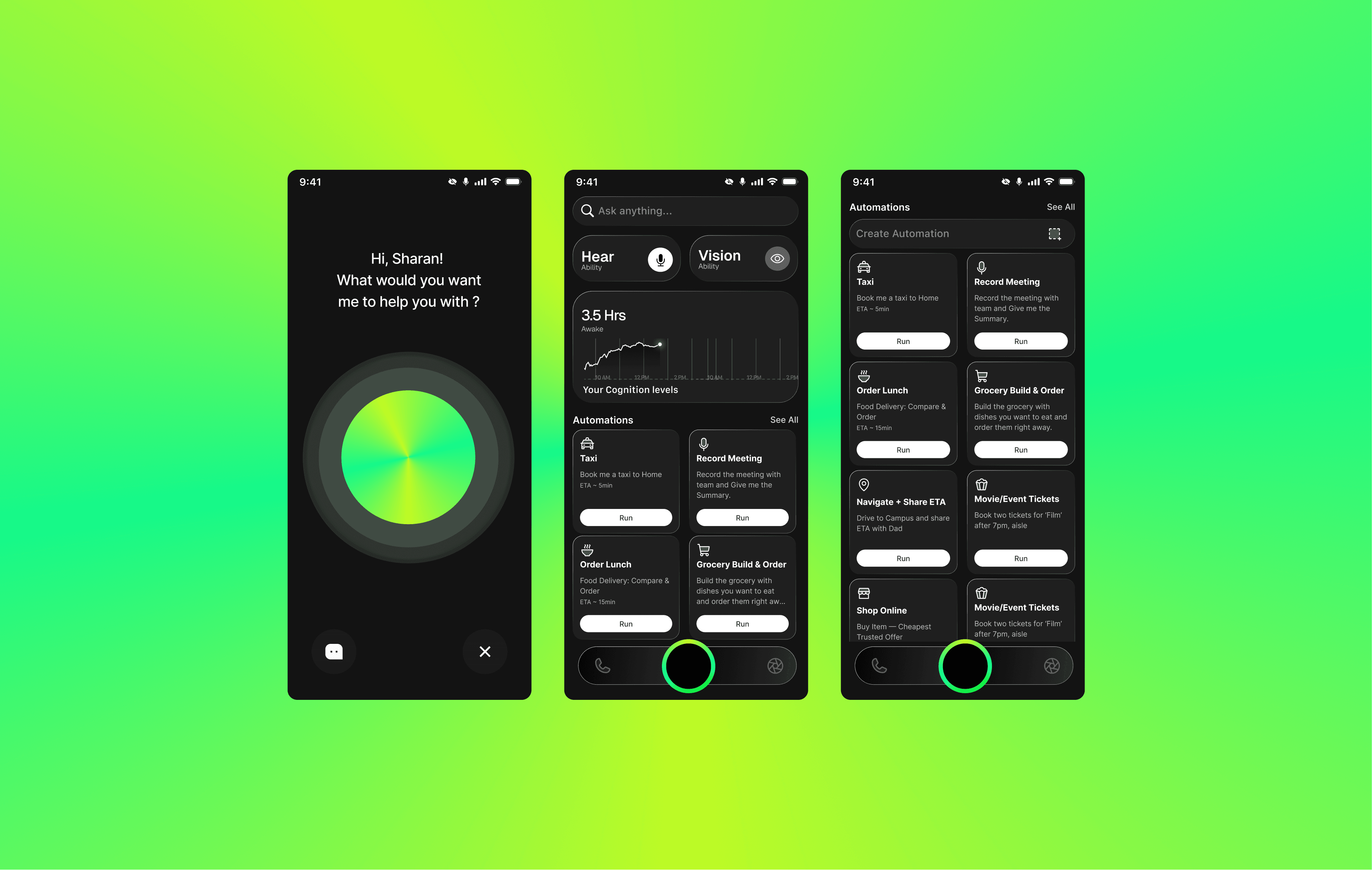
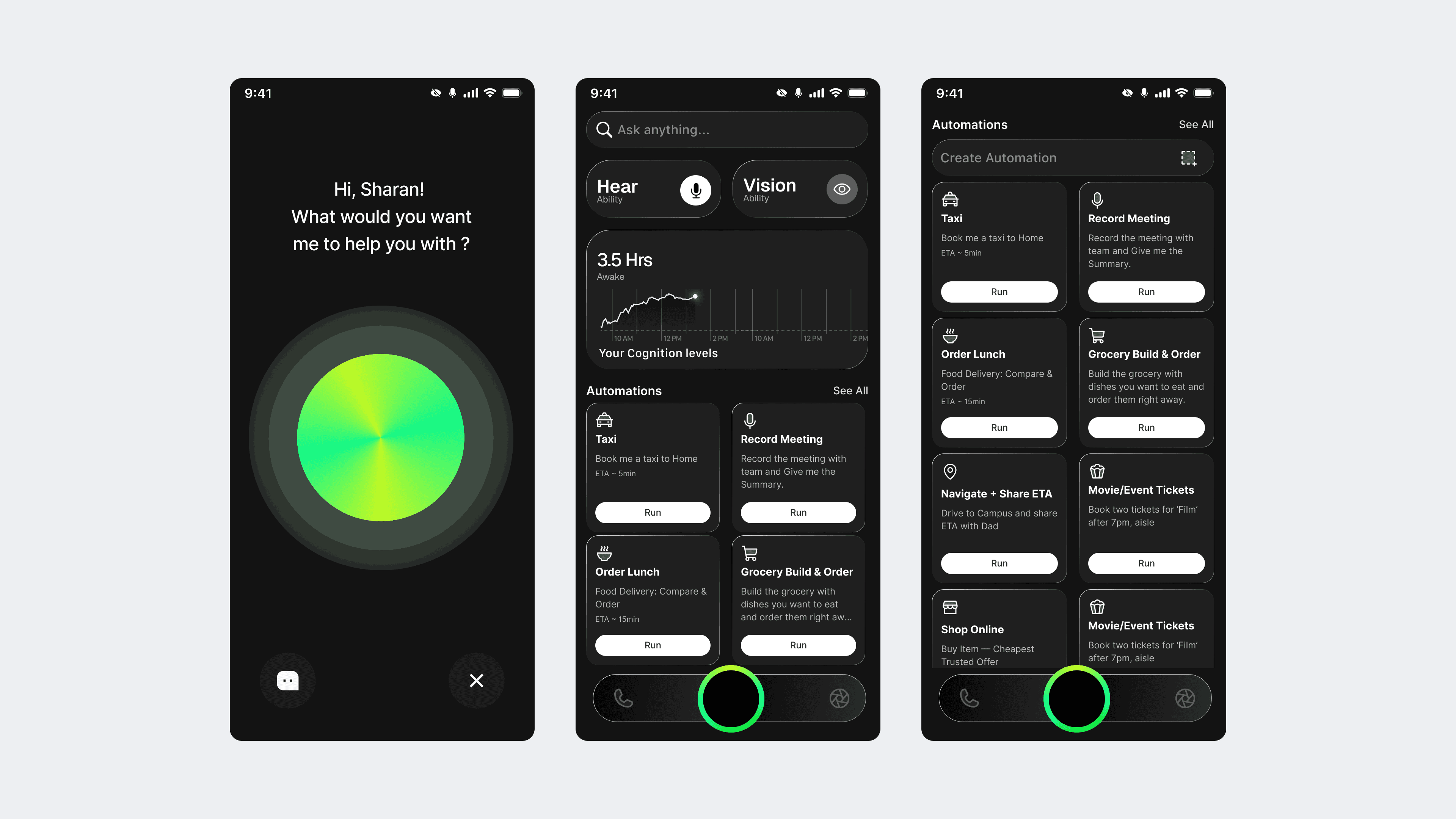
COGNIOS is a mobile OS concept that turns intent into outcomes using the new OS-level AI plumbing, keeps personal processing on-device, and reduces app-switching cognitive load that you will measure with standard methods.
COGNAIOS transforms smartphones from collections of disconnected applications into intelligent companions that understand natural language, anticipate needs, and execute complex multi-step workflows through conversational interfaces. Instead of forcing users to navigate between 80-90 apps daily, COGNAIOS provides a single, coherent interface that orchestrates all device capabilities through AI agents.
Why Design a Cognitive AI OS ?
Prioritized global smartphone users because they represent the largest addressable market experiencing universal pain from app-centric design. The convergence of advanced AI capabilities with proven user frustration created an unprecedented opportunity to reimagine mobile computing fundamentally.
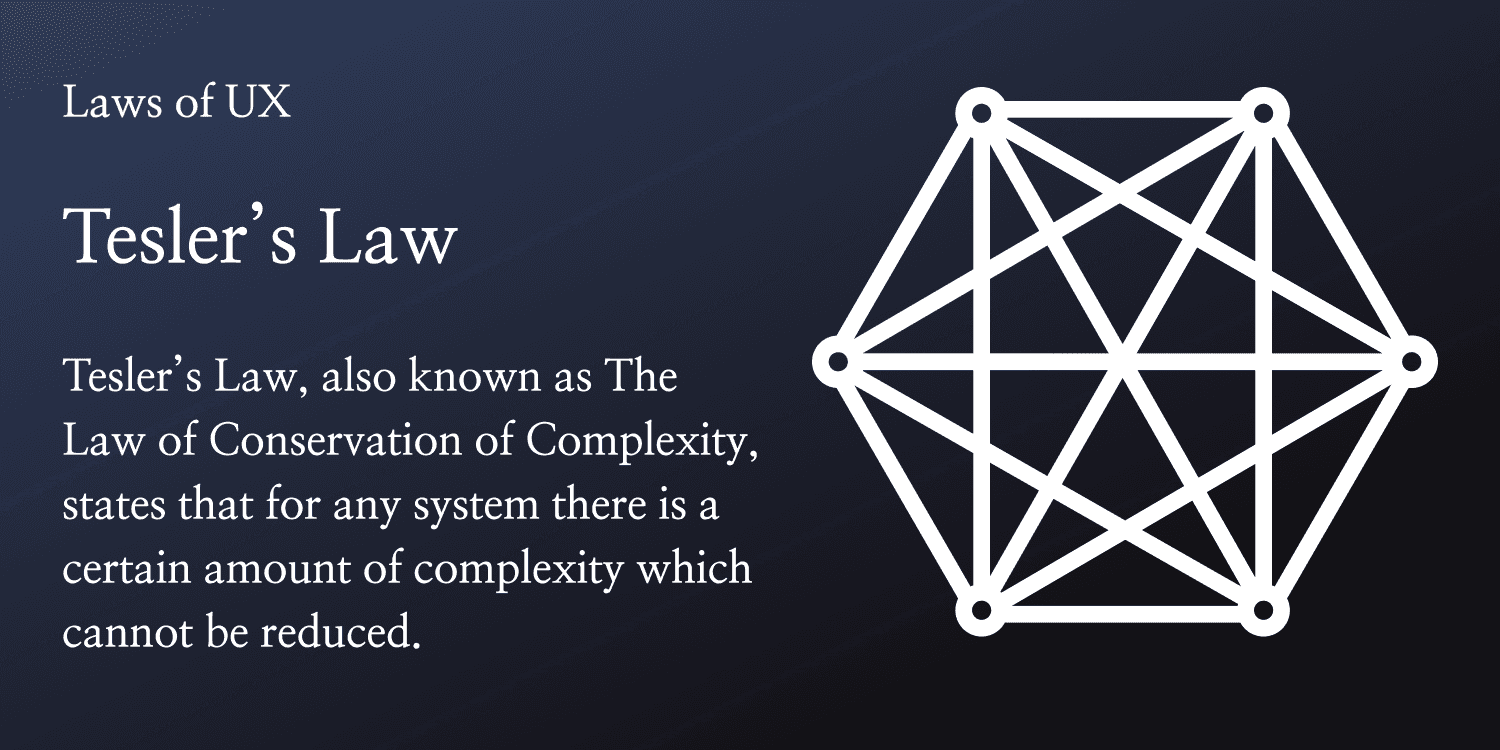
Design Philosophy: Embracing Tesler’s Law
Tesler’s Law of Conservation of Complexity, which states that every system has a certain amount of inherent complexity that cannot be removed, only shifted.
Current Mobile OS: Shifts complexity to the user. You must manage the workflows, remember the steps, switch the apps, and bridge the data silos.
COGNAIOS: Shifts complexity to the system. The AI Agent Architecture absorbs the burden of coordination, navigation, and context management.
The User flow Comparision
Android/IOS
Find app → Open → Login/verify → Navigate → Enter details → Compare manually (repeat across apps) → Confirm → Monitor in that app → Find/save result later
COGNAIOS
State intent (type/voice) → Agent gathers options via APIs → Shows one compare card → Confirm → Live card on Home → Auto-save to Memory (editable)
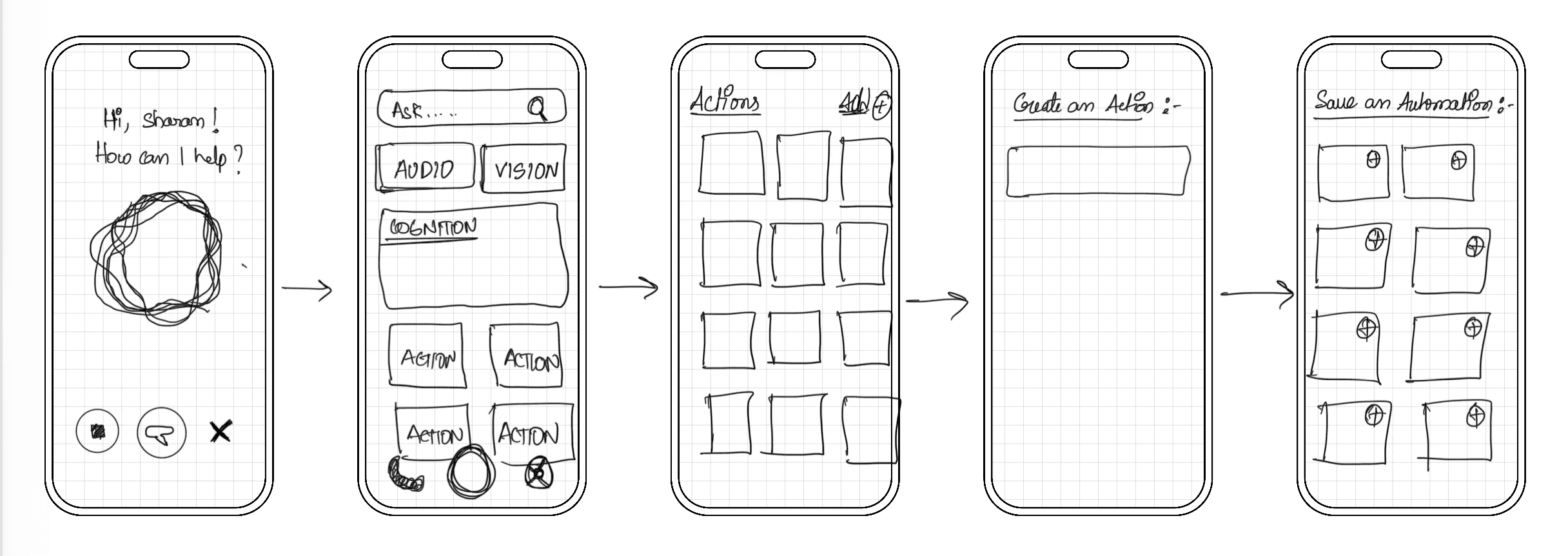
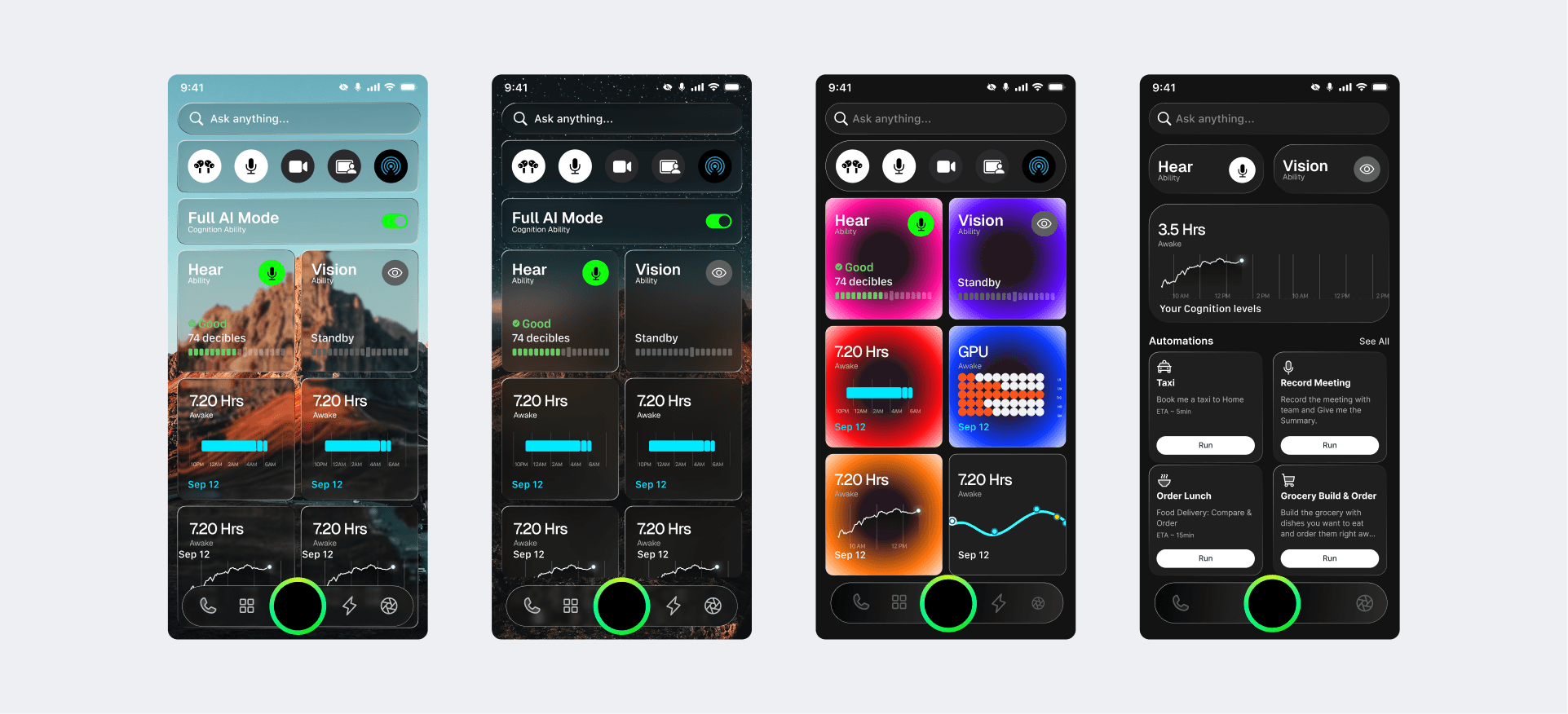
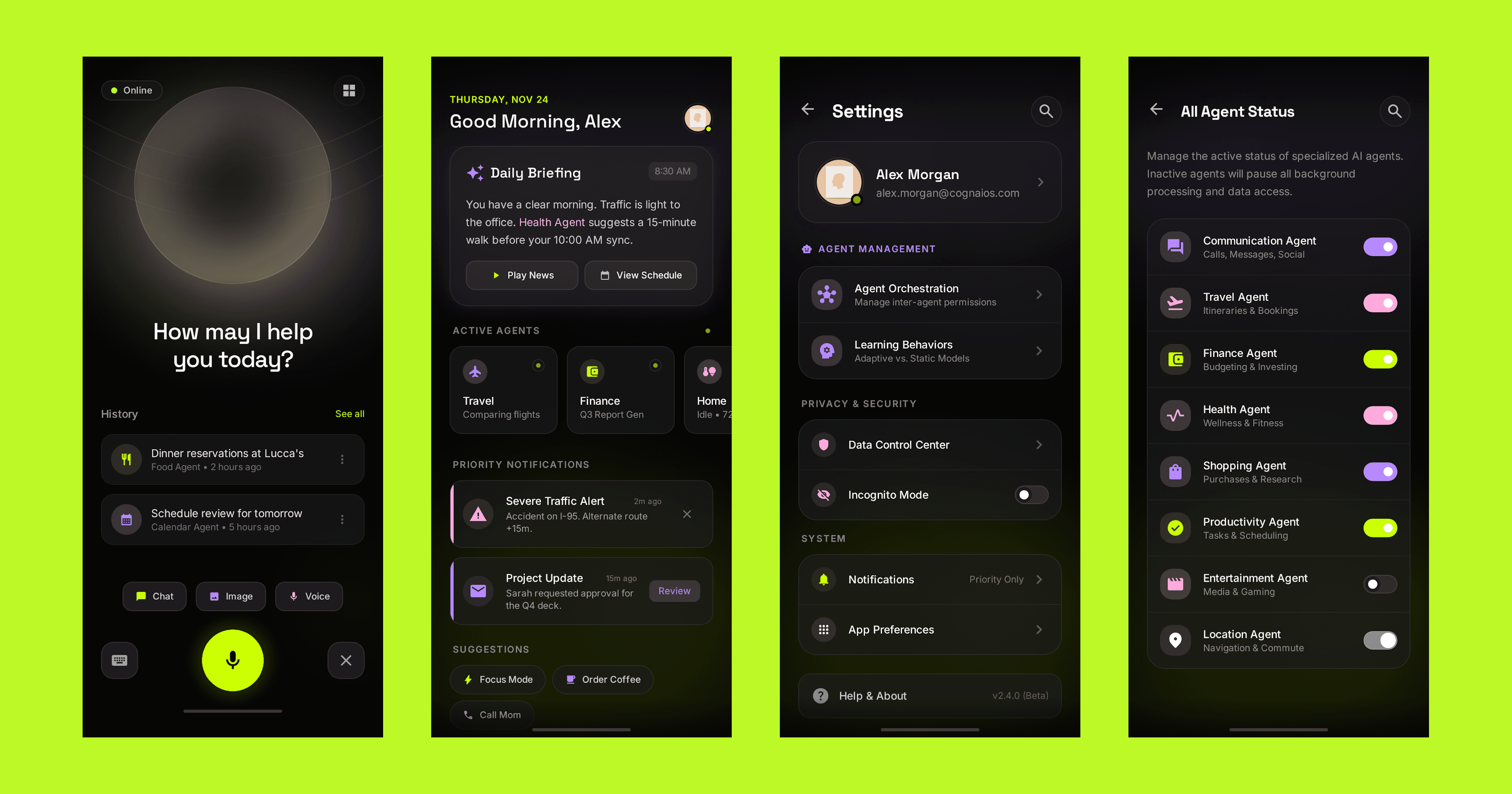
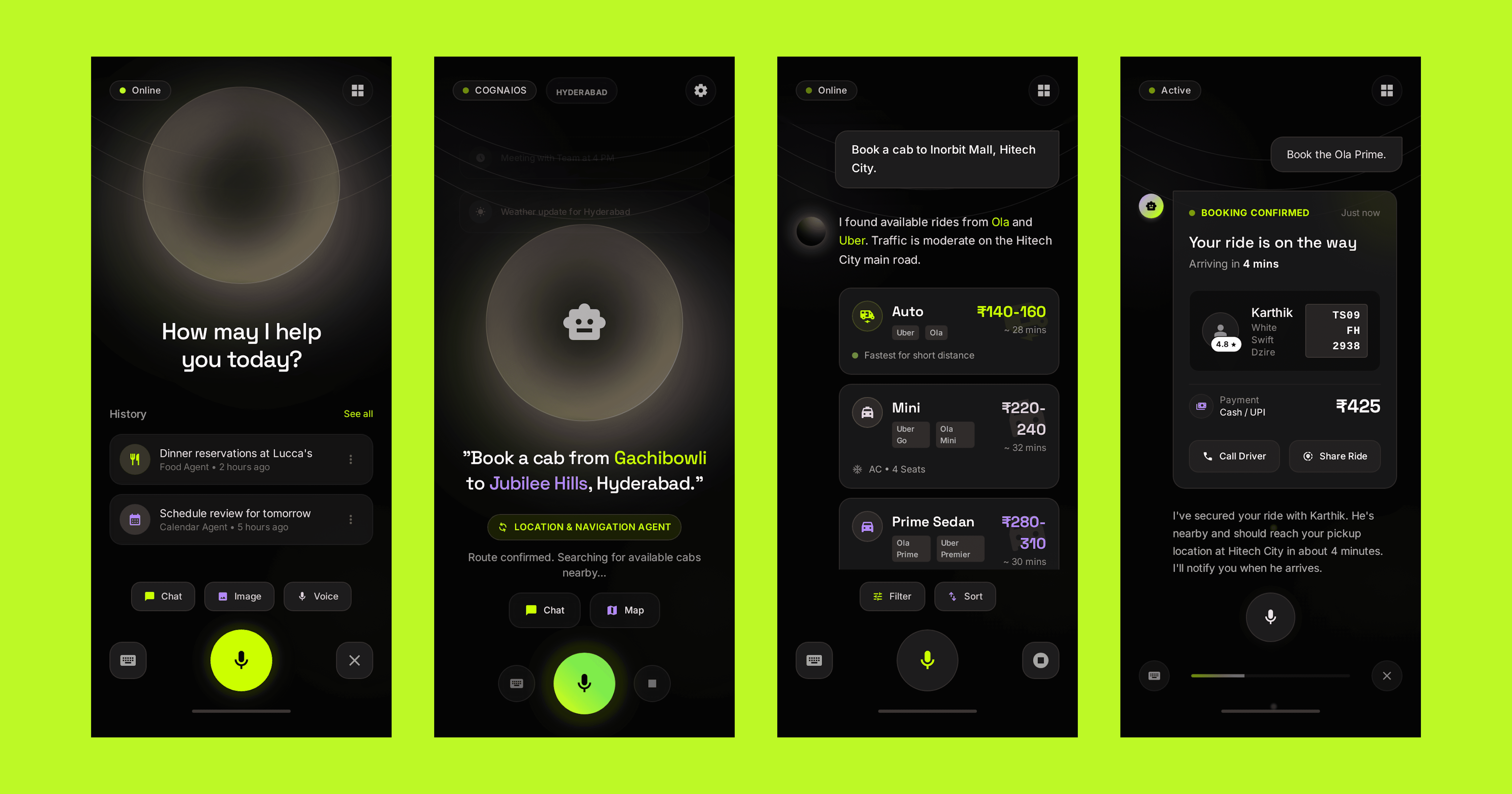
The Usual flow
Open rides app → type destination → check options (Uber/Auto/Bike) → compare prices/ETAs → confirm → share OTP → Take the Ride
The COGNAIOS flow
A simple 3 step user flow.
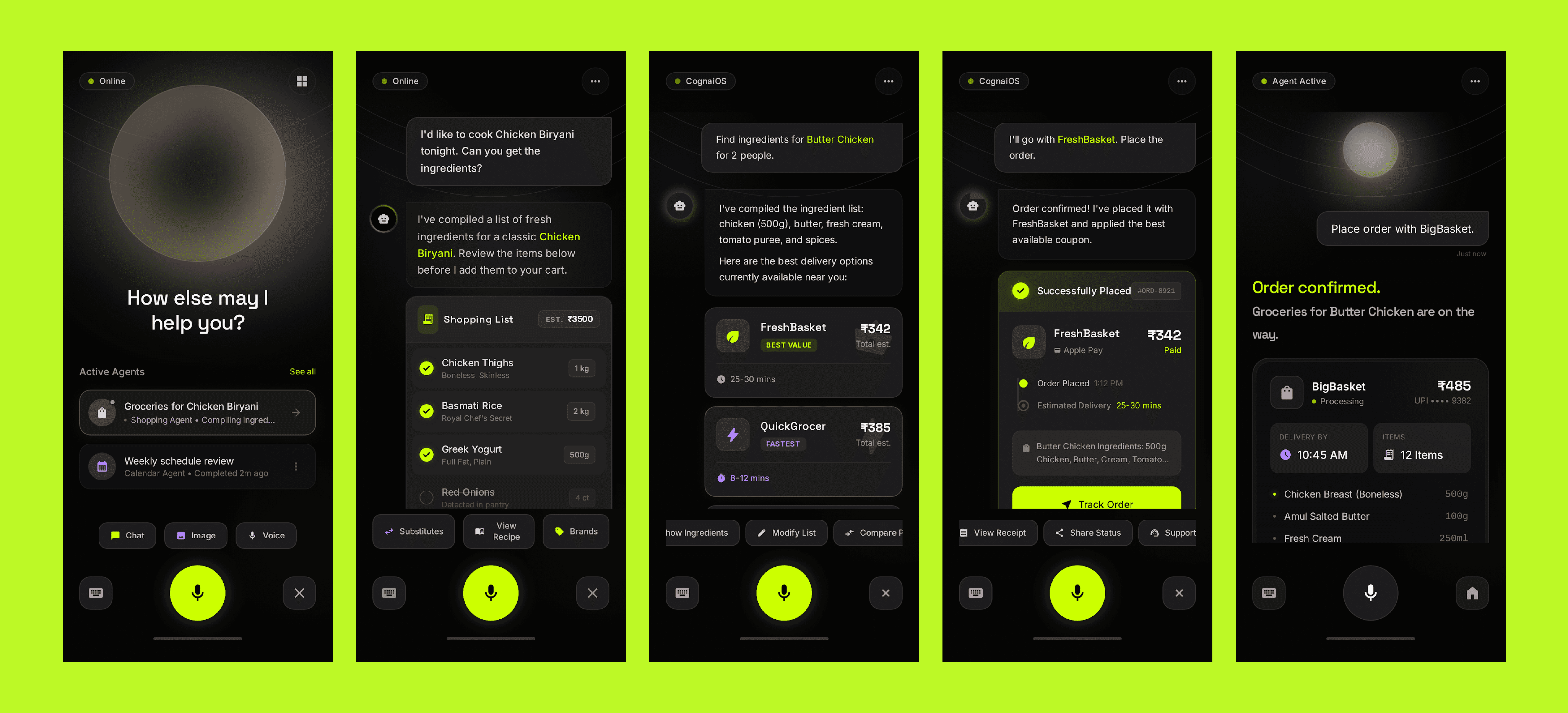
The Usual flow
Open grocery app → search each item → compare brands/prices → tweak to fit budget → choose delivery slot → pay.
The COGNAIOS flow
A simple 3 step user flow.
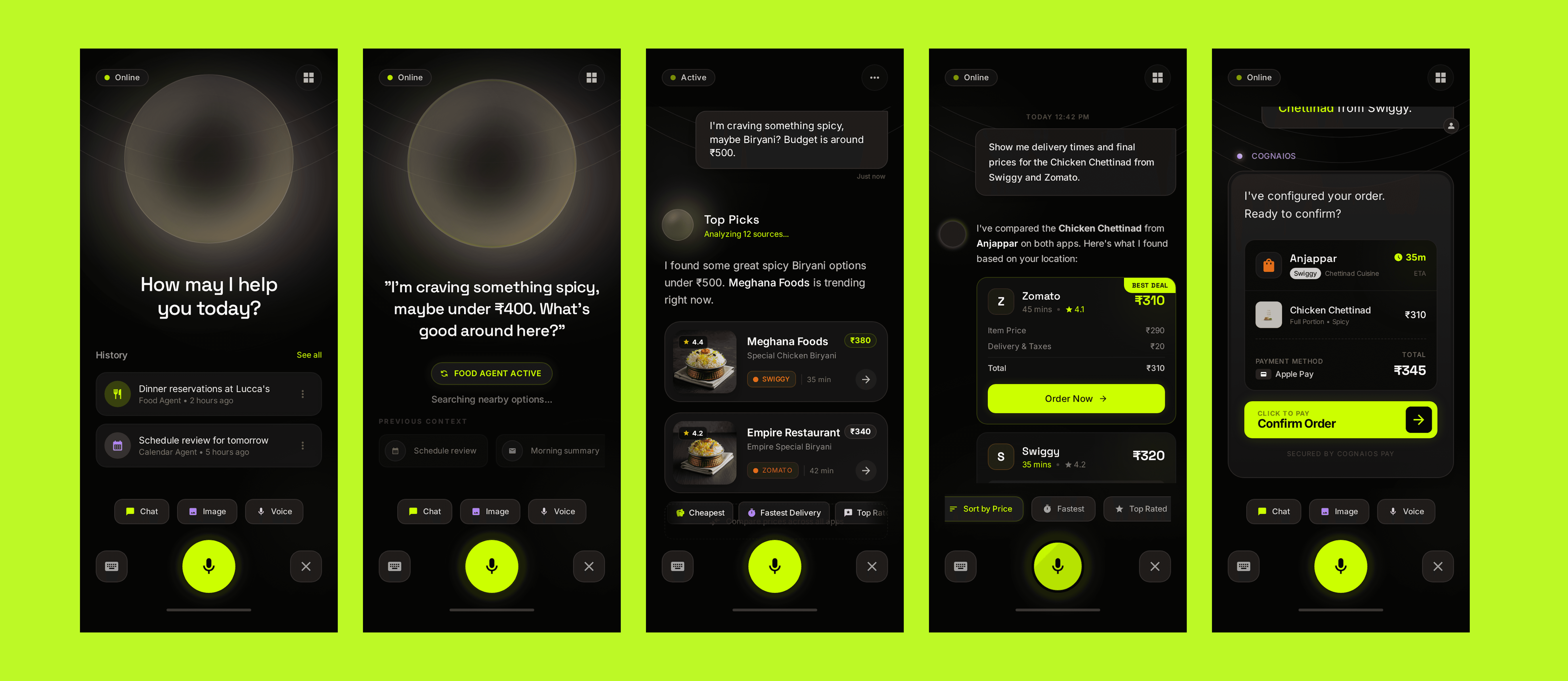
The Usual flow
Open food app → scroll endlessly → compare restaurants, fees, ETA → customize order → apply coupon → pay.
The COGNAIOS flow
A simple 3 step user flow.
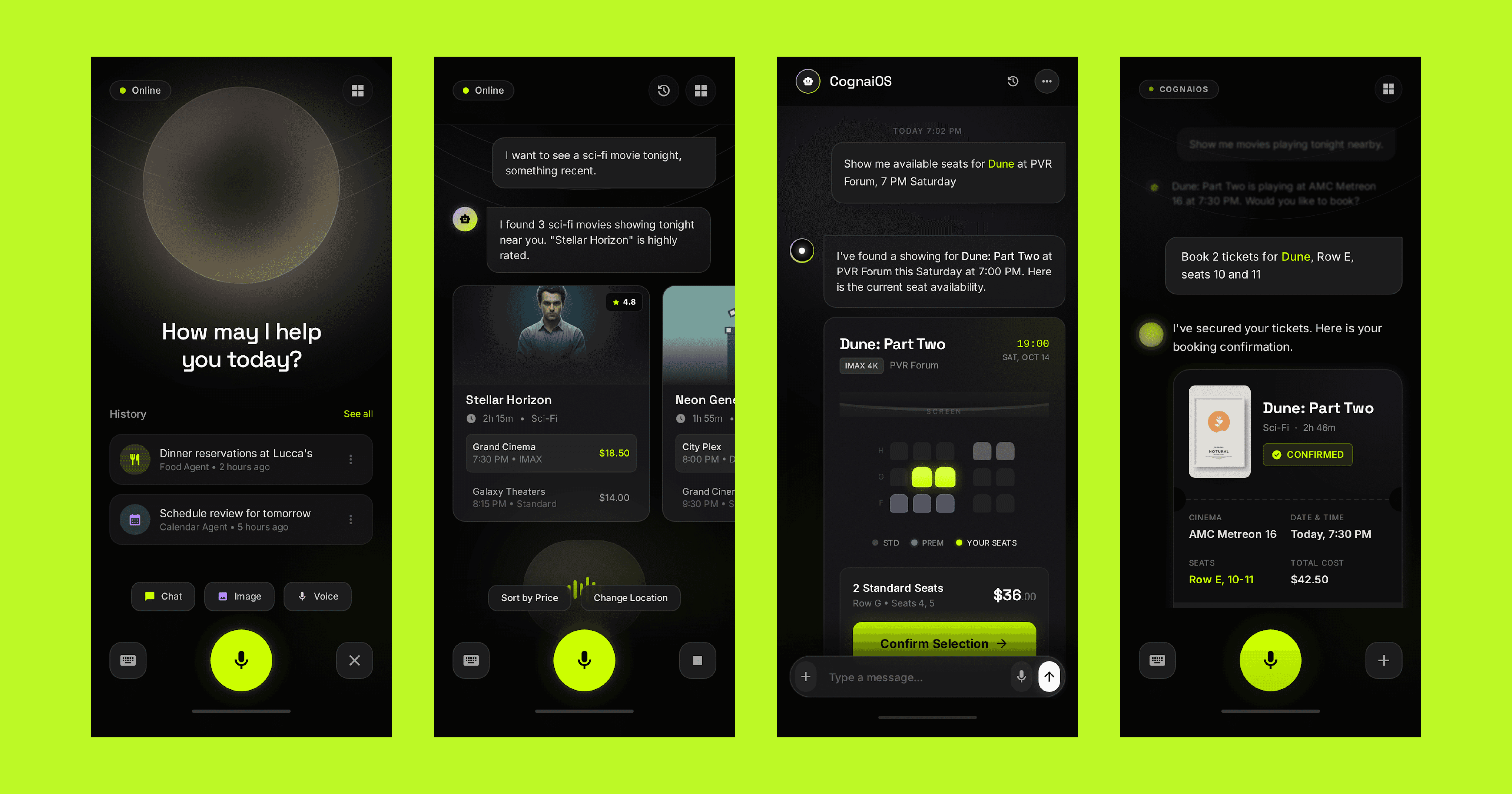
The Usual flow
Open ticket app → pick movie → compare shows/theatres → check friends’ availability manually → book → share screenshots.
The COGNAIOS flow
A simple 3 step user flow.
The Paradigm Shift
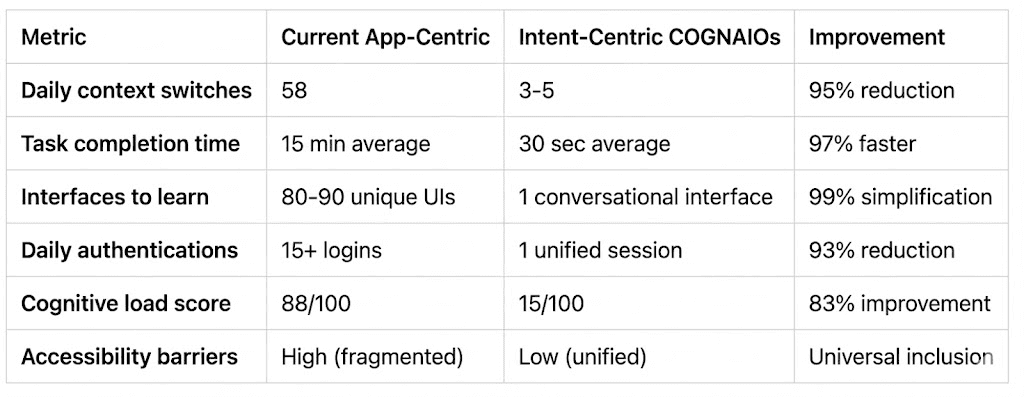
Mobile computing has been fundamentally app-centric for 15+ years. This case study demonstrates that a paradigm shift to intent-centric interaction is not only theoretically sound but empirically validated to reduce cognitive burden by 73-95% across diverse use cases.
Design Implications
This research demonstrates that systems-level UX thinking not incremental app-level optimization is required to solve fundamental usability problems. Intent-centric design principles represent a viable path forward for mobile computing that benefits all users, particularly those with accessibility needs.
Vision for Future Mobile Computing
Users express goals naturally ("Get me to the airport on time")
Systems orchestrate services invisibly (flights, cabs, notifications coordinated seamlessly)
Cognitive load is eliminated through intelligent automation
Accessibility is built into architecture, not retrofitted as a feature
Technology amplifies human capability rather than imposing interface-learning burden
That future is COGNAIOS : a paradigm shift from apps to intent, from fragmentation to unified interaction, from user-managed logistics to intelligent orchestration.
Next Project
Get a sneak peek at what’s coming next—innovation in the making